
EspoCRM
Customer relationship management: contacts, deals, activities, and email in one place.
- Use instead of
Salesforce,HubSpot CRM,Zoho CRM,Pipedrive- Typical address
espocrm.example.com- Project website
- www.espocrm.com
- Official docs
- docs.espocrm.com
Overview
EspoCRM helps you keep track of the people and companies you work with, the deals you’re pursuing, and every call, meeting, and email along the way.
Main capabilities:
- Accounts (companies), Contacts (people), and Leads (prospects not yet qualified).
- Opportunities (deals) with stages, amounts, and probability, shown as a kanban board.
- Activities: calls, meetings, and tasks, with a shared Calendar.
- Email: connect your mailbox to send and receive email inside the CRM and link messages to records automatically.
- Cases for customer support requests.
- Stream: a timeline of updates on each record and for the records you follow.
- Reports, dashboards, and workflows (some through EspoCRM’s paid extensions).
- Entity Manager and Layout Manager to add fields, record types, and change layouts without code.
What it replaces
EspoCRM replaces Salesforce Sales Cloud, HubSpot CRM, Zoho CRM, and Pipedrive for small and medium teams, without per-seat pricing.
Signing in
Open your EspoCRM address and sign in with the account your administrator created for you.
Core concepts
| Record | Use it for |
|---|---|
| Lead | Someone who has shown interest but isn’t qualified yet. Convert a lead to create an account, contact, and opportunity in one step. |
| Account | A company or organization. |
| Contact | A person, usually linked to an account. |
| Opportunity | A potential sale, with an amount, stage, and close date. |
| Case | A support issue raised by a customer. |
Everyday use
Add and find records
- Use Create on any list, or the + in the top bar for quick creation.
- The global search in the top bar searches across record types.
- On lists, use filters and save them as presets, such as “My open opportunities”.
Log activities
On a record’s detail page, use the Activities panel to schedule a call, meeting, or task. Completed activities move to History, building a full picture of the relationship.
Manage your pipeline
Open Opportunities and switch to the Kanban view. Drag deals between stages as they progress. Keep amounts and close dates current so forecasts and dashboards are accurate.
Connect your email
Open your avatar menu, Email Accounts, and Create Email Account.
Enter your IMAP details (from Superpanel or your administrator) and enable SMTP to send from the CRM.
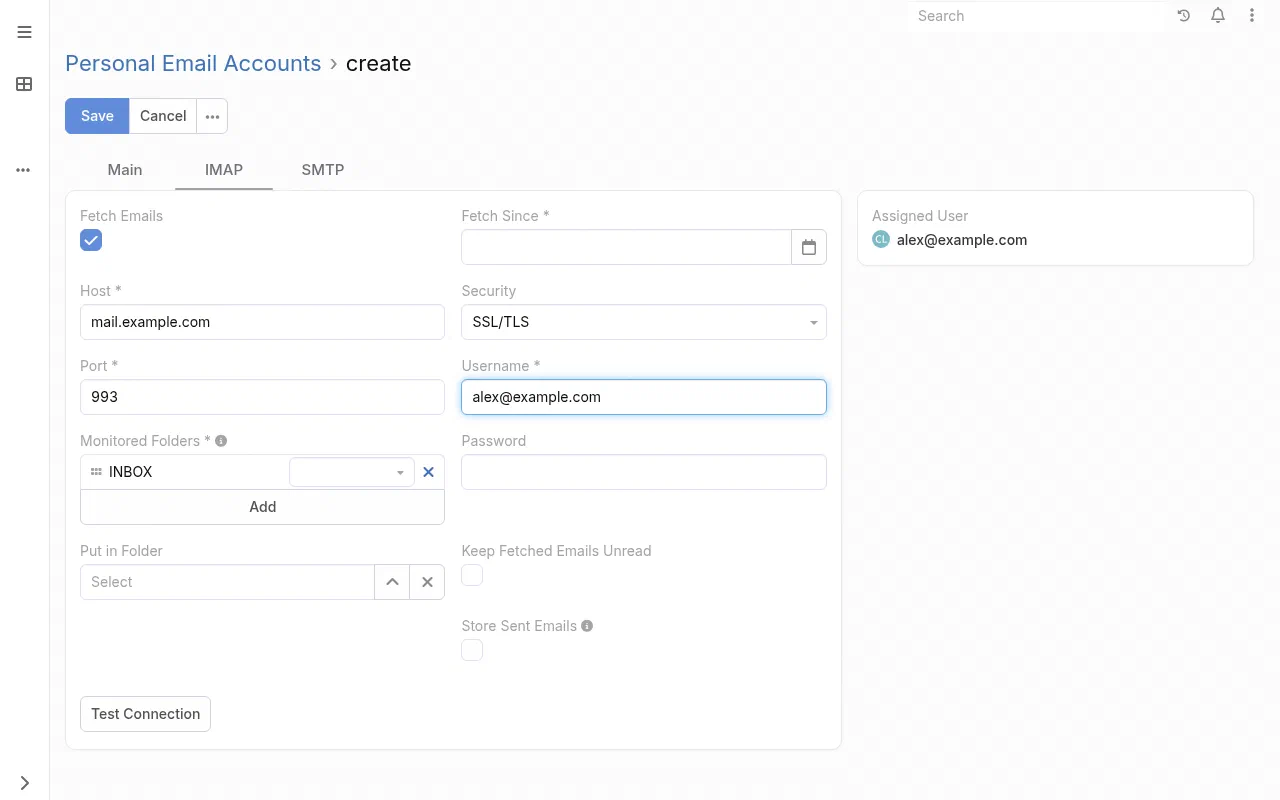
The IMAP tab of a new personal email account. Outgoing mail goes on the SMTP tab. Emails to and from known contacts are linked to their records automatically. Use Archive on others to link them manually.
Administer EspoCRM
Open Administration from the menu:
- Users, Teams, and Roles: control who can see and edit each type of record. Roles can limit access to “own” records, “team” records, or “all”.
- Entity Manager: add fields (dropdowns, dates, currency) and new record types.
- Layout Manager: arrange fields on detail, list, and search layouts.
- Import: bring in CSV exports from your old CRM. Map columns to fields, run a test, then import. Imports can be reverted.
- Outbound Emails and Inbound Emails: group mailboxes and case creation from a support address.
Superpanel settings
- Access: choose which groups are given the EspoCRM address.
- Administrator account: initial admin credentials are provided through Superpanel or Federated Computer support.
Scheduled jobs that EspoCRM needs (fetching email, sending reminders) are set up by Federated Computer. If email stops syncing, check Administration, Scheduled Jobs, then contact support.